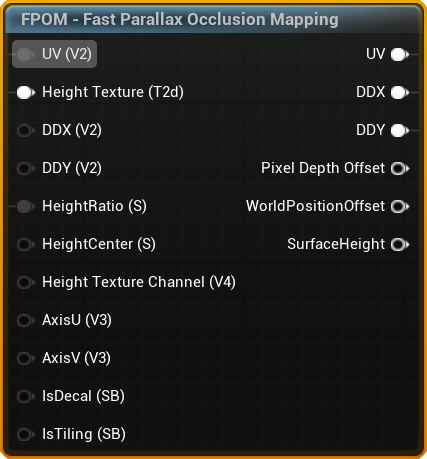
Inputs
UV
- Type:
UV - Default:
Texture Coordinate of UV 0
Height Texture
- Type:
Texture Object(Required) - Note: For packed textures use the
Height Texture Channelpin to set which channel holds the height texture
DDX
- Type:
float2 - Default:
ddx(UV) - Note: UV/DDX/DDY needs to be in sync. Use
FPOM - UV Derivatives Debug Helperto debug if the projection looks wrong.
DDY
- Type:
float2 - Default:
ddy(UV) - Note: UV/DDX/DDY needs to be in sync. Use
FPOM - UV Derivatives Debug Helperto debug if the projection looks wrong.
HeightRatio
- Type:
float - Default:
0.08
HeightCenter
- Type:
float - Default:
0.5 - Options: Value from
0to1.
0 means the parallax starts at the surface and grows down, 1 means it starts at the surface and grows up. 0.5 means the growth is evenly split up and down.
Height Texture Channel
- Type:
float4 - Default:
1,0,0,0
A channel mask (for example (1, 0, 0, 0) for red) selecting which channel of the heightmap texture holds the height data. Use this when the height is packed into a spare channel of an existing texture.
IsDecal
- Type:
Static Bool - Default:
false
A static bool signaling if the function is used on a decal.
IsTiling
- Type:
Static Bool - Default:
true
A static bool signaling if the height texture lookup should wrap or clamp. This value is always false if IsDecal is true.
Advanced
AxisU
AxisV
Outputs
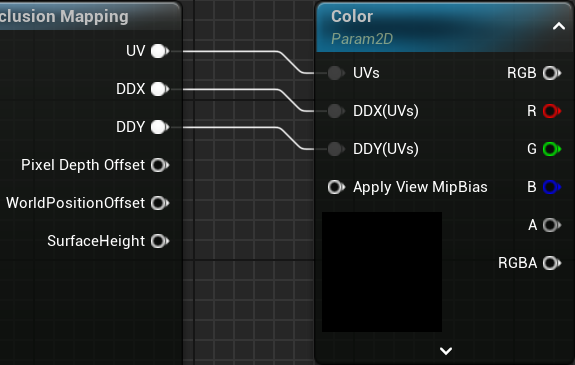
UV/DDX/DDY
It's important to always hook up UV, DDX and DDY to ensure correct MIP sampling and Anisotropic Filtering
UV
- Type:
UV
DDX & DDY
- Type:
float2
Set MipValueMode on your Texture Samples to Derivative to enable the DDX/DDY inputs.
Optional
Pixel Depth Offset
- Type:
float - Note: Virtual Shadow Maps tends to self-shadow incorrectly when PDO is used.
Used to set PDO in the material output to make the surface look more 3D when intersecting with other objects.
WorldPosition Offset
- Type:
float3
Used to offset the world position when using FPOM on a RVT landscape.
SurfaceHeight
- Type:
float - Returns:
0(bottom) to1(top)
Used to drive effects like fake AO in holes, water, etc.